
Simple REST API Example With HTTP and JSON
Learn how GET, POST, PUT, and DELETE work together to move data reliably.
GET, POST, PUT, and DELETE get taught like four separate vocabulary words, and nobody can keep them straight under deadline pressure. They form one system with one job: moving data between a client and a server in a shape everyone agreed on ahead of time. REST sets the rules, HTTP delivers the messages, JSON shapes what's riding inside them. Watching one request travel from a browser to a server and back makes the whole thing click faster than any glossary.
REST is a set of design rules, nothing more exotic than that. Resources live at URLs, and you act on them with a small, standard set of HTTP methods. HTTP is the protocol carrying those requests across the wire. JSON is the text format doing the heavy lifting inside the request and response bodies: lightweight, human-readable, and the default for almost every REST API built today. Confuse REST with HTTP and you'll burn an afternoon hunting through your network tab for "the REST protocol." REST was never a protocol to begin with, just a set of conventions for using HTTP well.
How HTTP Methods Map to CRUD
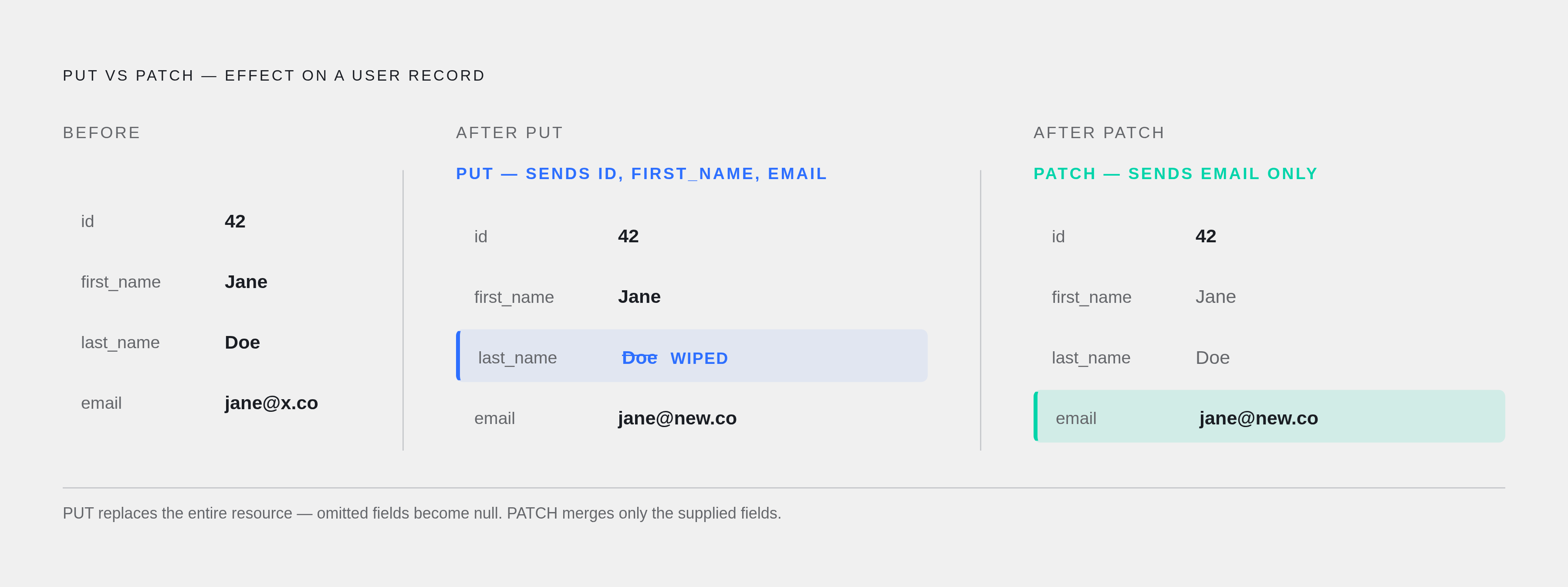
Four HTTP methods do almost all the work in a REST API. Each lines up with a classic CRUD operation (Create, Read, Update, Delete). PUT and PATCH are not interchangeable, and treating them as the same method is how APIs quietly eat data.
GET → Read. Retrieves a resource. Returns
200 OKon success,404 Not Foundif it doesn't exist.POST → Create. Sends a new resource in the request body. Returns
201 Createdon success.PUT → Update, full replace. Sends the entire updated resource and overwrites what's there. Idempotent.
PATCH → Partial update. Sends only the fields that changed. Idempotent in some implementations, not all.
DELETE → Delete. Removes the resource at that URI. Returns
200 OKon success.
PUT replaces the whole resource, including fields you never meant to touch. Send a PUT with half a user object filled in and the fields you left out get wiped clean. Send a PATCH with just one field and everything else stays put. Teams that default to PUT for every update because it seems simpler are the same teams fielding support tickets about phone numbers that vanished overnight. That is the direct, mechanical result of choosing the wrong verb.
An operation is idempotent if firing it once and firing it fifty times leave the server in the exact same state. GET, PUT, and DELETE qualify. POST doesn't, since each call creates a new record. PATCH sits in a gray zone: idempotent in some codebases, not in others, depending on what "changed fields" means to whoever wrote that endpoint.
HEAD and OPTIONS exist too. They don't map to CRUD operations and won't be covered further here.
The Data Model Behind All Examples
Every example below runs against a users resource. One user object looks like this:
{
  "id": 1,
  "first_name": "Aria",
  "last_name": "Dominguez",
  "email": "aria.dominguez@example.com"
}
The starting dataset holds five of these in an array:
[
  { "id": 1, "first_name": "Aria", "last_name": "Dominguez", "email": "aria.dominguez@example.com" },
  { "id": 2, "first_name": "Malik", "last_name": "Chen", "email": "malik.chen@example.com" },
  { "id": 3, "first_name": "Priya", "last_name": "Nair", "email": "priya.nair@example.com" },
  { "id": 4, "first_name": "Owen", "last_name": "Blackwood", "email": "owen.blackwood@example.com" },
  { "id": 5, "first_name": "Sofia", "last_name": "Reyes", "email": "sofia.reyes@example.com" }
]
The base URL is http://localhost:3000/users. Reach one specific user by appending the ID as a path segment: /users/1. Keeping path segments and query parameters serving distinct purposes removes most of the confusion around REST URL design.
Annotated Examples: GET, POST, PUT, DELETE
GET all users
GET /users HTTP/1.1
Host: localhost:3000
Accept: application/json
HTTP/1.1 200 OK
Content-Type: application/json
[ ... all five user objects ... ]No body goes out with this request, only headers. The server returns the full array. Safe and idempotent.
GET one user
GET /users/1 HTTP/1.1
Host: localhost:3000
Accept: application/json
HTTP/1.1 200 OK
Content-Type: application/json
{ "id": 1, "first_name": "Aria", "last_name": "Dominguez", "email": "aria.dominguez@example.com" }A request for /users/999 returns 404 Not Found instead. The ID travels in the URL path, never in the body. A GET request with a JSON body attached indicates something has gone wrong upstream.
POST a new user
POST /users HTTP/1.1
Host: localhost:3000
Content-Type: application/json

{ "first_name": "Devon", "last_name": "Marsh", "email": "devon.marsh@example.com" }
HTTP/1.1 201 Created
Content-Type: application/json
{ "id": 6, "first_name": "Devon", "last_name": "Marsh", "email": "devon.marsh@example.com" }The server assigns the ID and returns the full object. That 201 confirms a new resource was created. POST is neither safe nor idempotent, so running this exact request twice creates two duplicate records in the dataset.
DELETE a user
DELETE /users/6 HTTP/1.1
Host: localhost:3000
HTTP/1.1 200 OK
Content-Type: application/json
{ "message": "User deleted" }Fire this twice. The first call removes the user; the second finds nothing there. The end state is the same either way: one user gone, which is the defining property of an idempotent operation.
Running This API Locally in Node.js
JSON Server is the right call for instant mocking with zero backend code:
npm init -y
npm install -g json-server
Drop the five-user array into a file called users.json, then run:
npx json-server --watch users.jsonThe server comes up at http://localhost:3000, and all four CRUD endpoints work immediately against that file. No routes to write, no logic to wire up. It gives a frontend developer a working endpoint to point at while the backend is built out properly.
Express is the right choice once you need actual logic behind the endpoints:
npm init -y
npm install express
Then in server.js:
const express = require('express');
const app = express();
app.use(express.json());

app.get('/users', (req, res) => { /* return all users */ });
app.post('/users', (req, res) => { /* create user, return 201 */ });
app.put('/users/:id', (req, res) => { /* replace user by id */ });
app.delete('/users/:id', (req, res) => { /* remove user by id */ });

const PORT = process.env.PORT || '3000';
app.listen(PORT, () => console.log(`Running on port ${PORT}`));
express.json() parses incoming JSON bodies. Without it, req.body comes back empty every time and every POST and PUT fails silently, with nothing throwing an obvious error. The :id in each route is a URL parameter, pulled out in code as req.params.id. Using process.env.PORT with a 3000 fallback means the same code runs locally and on a hosting platform without modification.
Flask works fine too if the team works in Python. Routes, methods, and JSON parsing all transfer directly. Only the syntax changes.
What Separates Good APIs From Bad
REST says nothing about error format consistency, nothing about pagination shape, nothing about idempotency keys. An API can follow every rule from the sections above and still be difficult to build against. That gap between technically correct and usable is where most real-world API complaints originate.
Common problems in APIs shipping today include error formats that shift depending on which endpoint threw the error, pagination that works on one list endpoint and disappears on the next, and status codes that contradict what the documentation claims they mean. Developers stop trusting the docs and start relying on trial and error instead, which slows down everyone working against that API.
Good design shows up in specific, repeatable decisions:
Errors come back as JSON in one consistent shape, never an HTML 500 page delivered to a client that expected structured data.
Status codes match reality. A created resource gets
201; returning a generic200leaves the client uncertain whether anything actually happened.Resource names stay nouns, plural, lowercase, hyphenated when needed:
/users, never/getUseror/User_List. That naming convention keeps a growing API legible over time precisely because it gets applied consistently.
Stripe's API documentation is frequently cited as the standard to measure against. A unified left-rail navigation combines reference material and tutorials so developers don't have to switch between multiple tabs to understand how an endpoint works. Code samples appear in multiple languages and update live as a reader navigates the docs. Developers can fire real test-mode calls without leaving the documentation page. The documentation functions as the onboarding experience itself.
How Search Engines Index REST API Docs
According to Brand Story, 89% of developers start their API research through a search engine. Search visibility belongs in the docs from day one, not added after launch once traffic is thin.
Two technical problems reduce search rankings before content quality even becomes a factor.
First, JavaScript-rendered single-page applications. Google has to render the page before it can index it, and that step can add delays running from days to weeks. A page sitting in the rendering queue doesn't rank regardless of content quality.
Second, duplicate URLs from versioning and filtering. /api/users?version=v1 and /v1/api/users might serve identical content, but search engines treat them as two separate pages splitting the same authority instead of one page earning all of it. This happens by accident when versioning gets added without a canonical tag pointing back to one authoritative URL.
AI crawlers add a second audience entirely. Cloudflare changed its default configuration to block AI crawlers, meaning any site running on Cloudflare's defaults may have locked out every major AI platform's crawling agent without any alert appearing in analytics.
Model Context Protocol, or MCP, is the channel through which AI agents built on large language models read API documentation directly, without a human navigating a browser. Docs now need to be legible to a machine parsing them line by line, while also remaining clear to a developer scanning the same page to find a specific endpoint. Writing exclusively for one audience makes the documentation less useful to the other.