WebSocket Testing Tools for API Development Teams
Most teams pick one tool and miss the other two failure modes where production incidents hide.
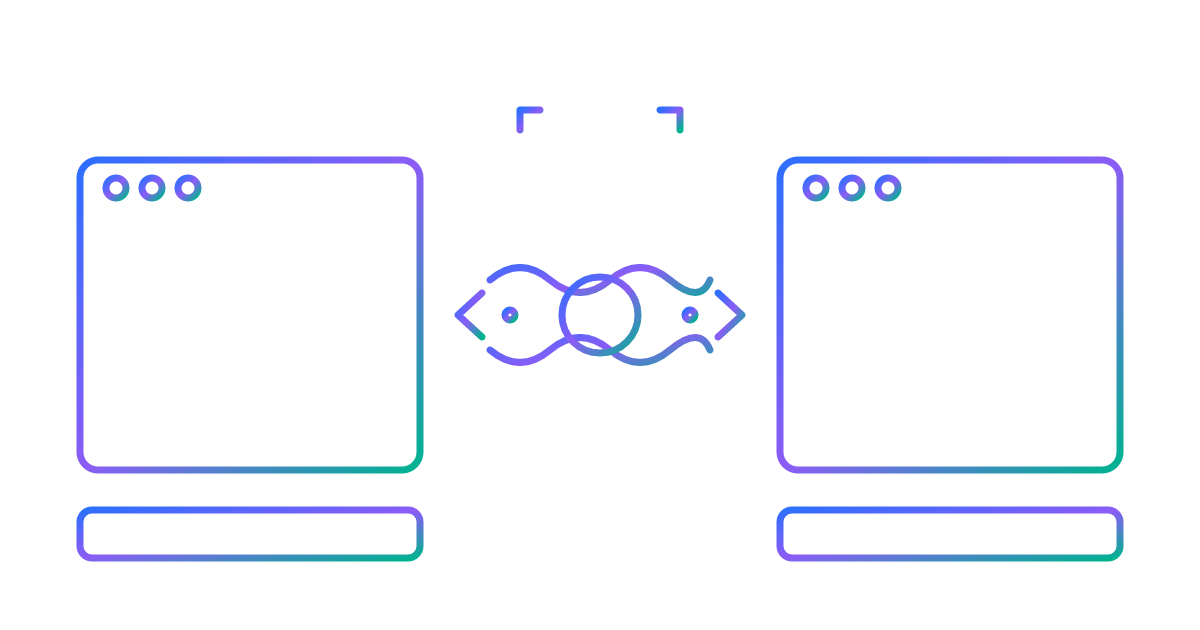
WebSocket testing is really three separate jobs wearing one trench coat: check that messages work, check that your implementation follows the spec, and check that the whole thing survives a few thousand people connecting at once. Most teams grab one tool, assume it does all three, and move on with their lives. That gap is exactly where a lot of production incidents get born.
HTTP tools got you this far because HTTP doesn't remember you. A request goes out, a response comes back, and the connection forgets the conversation ever happened. WebSocket keeps the line open instead, so both sides can talk whenever they feel like it. If the call drops, you need to know why, and whether it reconnects on its own or just sits there sulking. That changes what "testing" even means here: connection lifecycle, message order, and how many calls the switchboard can hold at once all become things you check on purpose, because the protocol won't check them for you.
Three kinds of failure show up in this world that HTTP testing never has to think about. Connection lifecycle failures come first: handshake errors, drops mid-session, reconnect logic that spins its wheels instead of actually reconnecting. Then there's bidirectional flow trouble, where the server pushes a message out of order or two sends get tangled up and the client reads them wrong. And concurrent connection load behaves nothing like REST load, since a REST server chokes on request rate while a WebSocket server chokes on how many open connections it's holding in memory at once. Different problem, different fix, and no amount of REST experience prepares you for it.
Most of what actually flows through these connections is plainer than people guess, too. A 2021 measurement study found 88.4% of WebSocket messages are text, and 69% of that text is JSON, according to research published by Georgia Tech. So a good chunk of your testing work is just validating JSON payloads and message logic, not wrestling binary streams into submission. That said, the framing underneath still needs checking, because a malformed frame doesn't care that your payload was "just JSON." Encryption isn't optional either, and encrypted WebSocket traffic (wss://) was projected to hit 80% of all WebSocket traffic by 2025, which puts TLS handling right on the baseline checklist next to everything else.
Stack those three failure modes together and you land on the real point: no single tool does all of this well. Your testing setup is going to need more than one tool, so plan for it now, not after the incident review.
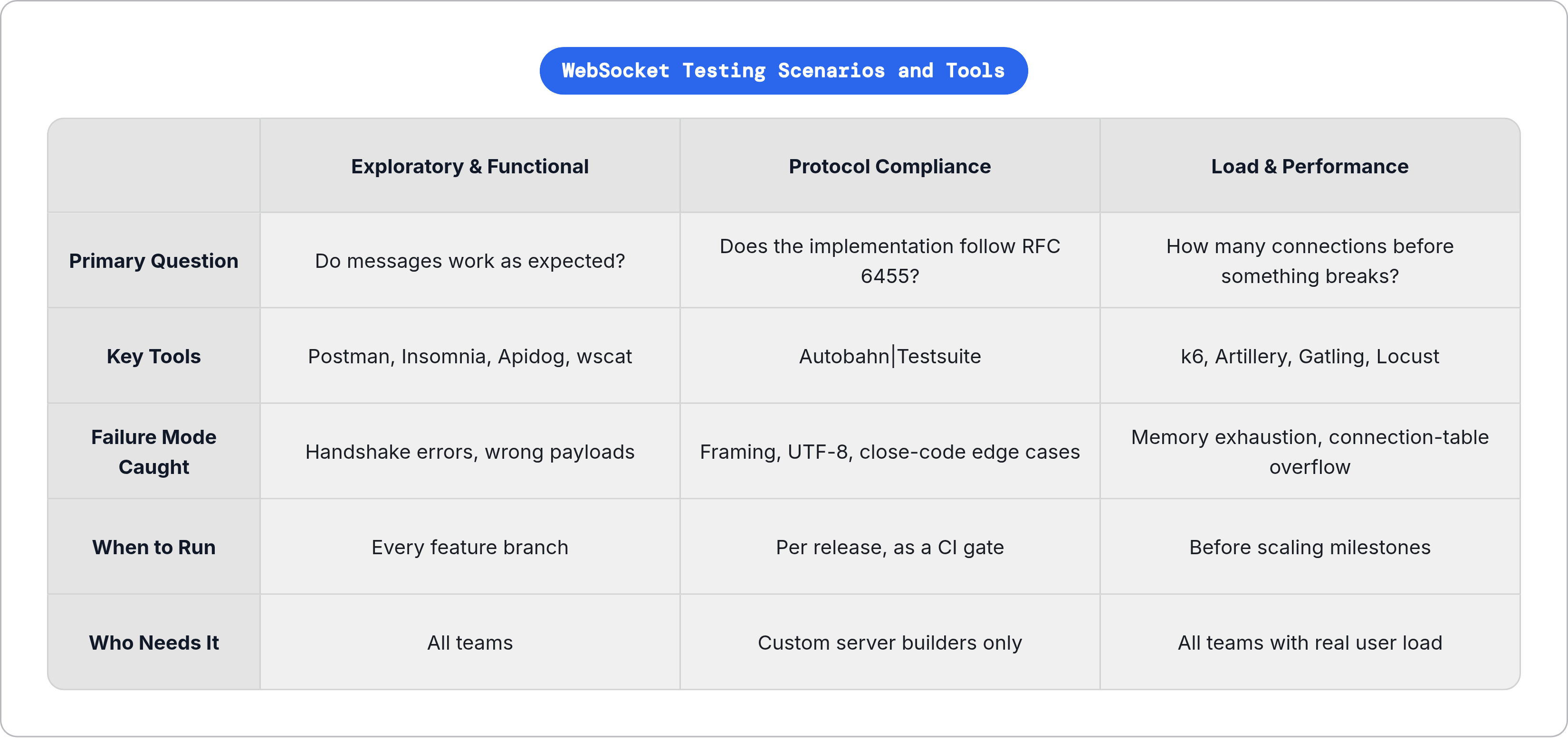
How to read the rest of this guide: three testing scenarios, not one tool ranking
This guide is organized by scenario, not "best tool overall," because "best" depends entirely on which problem happens to be on fire in front of you.
Scenario one is exploratory and functional testing. You open a connection, send messages, watch what comes back. Almost every team starts here, and a lot of teams never leave, which is the actual problem. A connection that behaves fine when you're clicking through it by hand can fall over the second thousands of real users hit it at once, and functional testing alone will never warn you that's coming.
Scenario two is protocol compliance: does your WebSocket implementation actually follow RFC 6455, or does it just look fine because your test cases happen to dodge every edge case? Scenario three is load and performance: how many concurrent connections the server can hold before something breaks, and which piece breaks first.
Here's the line that actually matters. Consuming someone else's WebSocket API? You probably only need scenario one. Building your own WebSocket server library, or bolting a WebSocket stack onto something new? You need all three, and skipping one is a bet you're making without realizing you made it. Security testing gets its own section further down, and it borrows heavily from the exploratory tools. It asks a different question, though, so it gets treated separately.
Exploratory and functional testing: GUI clients and CLI tools
This job needs a handful of specific things: a way to connect with custom headers and auth tokens, a way to fire off messages in different formats and watch responses land, a log you can replay when something breaks at 2am (ask me how I know), and ideally a spot where your WebSocket tests sit next to your REST and gRPC tests instead of some separate tab you forget exists by Thursday.
Postman is the default if you're already living there for REST. WebSocket connections sit right in your Collections next to HTTP requests, so a test flow spanning both protocols is one test, not two duct-taped together. If your team's already in Postman, there's no real reason to pack up and leave.
Insomnia covers REST, GraphQL, gRPC, WebSocket, and Server-Sent Events under one roof. It picked up AI-assisted test generation and Git-based version control for APIs in 2025, and it's a solid pick when SSE and WebSocket testing need to sit side by side without a tool switch every ten minutes.
Apidog is built around the loop of developing, testing, and documenting APIs together. The handshake takes custom headers, cookies, and query parameters, and it handles JSON, XML, Text, Base64, and Hexadecimal message formats. Building something like live chat or a real-time multiplayer game and want the docs sitting right next to the tests? This is the natural fit.
Hoppscotch is browser-based, open-source, and light on its feet. It covers REST, GraphQL, WebSocket, Socket.IO, MQTT, and SSE, but each protocol runs in its own isolated request with no shared state between them. Fine for a quick check, though not the tool if you need to chain a REST call into a WebSocket session as one continuous test.
Bruno stores everything as plain text.bru files right in your project directory. No cloud, no account, MIT licensed, version-controlled by default. WebSocket support is basic, but for security-conscious or air-gapped teams where data doesn't leave the local machine, that limitation is kind of the whole point.
Voiden pushes the offline-first idea even further: requests, tests, and docs all live in plain Markdown.void files, Git-native from day one. WebSocket support comes as an installable plugin, so you only add what you actually need. It's Apache 2.0 licensed, and your WebSocket test scenarios get reviewed in pull requests exactly like code does, which teams under strict change management tend to genuinely like.
wscat is the CLI option, installed via npm. It takes custom headers and subprotocols right at connection time, and since it's scriptable, it slots into automated pipelines without any fuss. When a developer just wants to fire off a quick connection test from a terminal instead of opening a GUI, this is the tool.
A few browser-native options round things out. Chrome DevTools is already sitting on your machine and gives you live connection monitoring and message inspection for a browser session, though it's built for debugging, not scripted repeatable tests. The WebSocket Test Client Chrome extension has over 70,000 users and a 4.4-star rating, handy for quick message construction without leaving the tab. WebSocket King does something similar without the browser-extension lock-in.
Already on Postman or Insomnia for REST? Stay there, since the WebSocket support is good enough that switching just isn't worth the hassle. Building a real-time product where docs and tests need to live together? Go Apidog. Local-first with version control as the priority? Bruno or Voiden. Terminal-first or CI-driven? wscat. Debugging a live session in-browser? Chrome DevTools.
Protocol compliance testing: verifying the implementation, not just the behavior
Do you even need this section? If you're using a mature third-party library like Node.js's ws, Python's websockets, or a browser's native WebSocket API, you can generally trust that library's compliance already, since most popular libraries score 517 out of 517 on the industry's standard compliance suite. If you're writing your own WebSocket server, or wiring a WebSocket stack into some new runtime, none of that trust transfers, and this section is written for you specifically.
Autobahn|Testsuite is the industry standard here. It runs over 500 test cases covering RFC 6455 protocol framing, UTF-8 handling, close codes, and the permessage-deflate compression extension. Chrome, Firefox, Safari, Node's ws, and Python's websockets all clear it at 517/517.
Running it is simpler than it sounds: docker run -it crossbario/autobahn-testsuite, and you're testing. No elaborate local setup required.
One thing worth knowing up front instead of discovering the hard way at 11pm before a release: the Docker image is intentionally frozen on an old PyPy2-era base (Python 2.7, OpenSSL 1.1.x) to keep the reference testbed stable and reproducible. That's a deliberate choice, not neglect, but it means newer base images will break the pinned dependencies. Teams on modern infrastructure need to plan around it rather than fight it.
A passing Autobahn run tells you your implementation handles the spec's edge cases under controlled conditions. Load behavior and application-level message logic are separate questions, and Autobahn doesn't touch either one. Run it in CI as a one-time or per-release gate at the implementation layer, not something you rerun on every feature branch.
Load and performance testing: simulating concurrent connections at scale
REST load testing asks how many requests per second. WebSocket load testing asks something else entirely: how many connections stay open at once, each one potentially streaming messages the whole time it's alive. The failure mode usually isn't CPU or throughput; it's server memory and connection-table exhaustion, the kind of thing that stays invisible right up until connections reach a certain ceiling, and then hits everyone at once. A useful test script has to simulate realistic message cadence too, not just connect-and-disconnect on a loop like some kind of digital fire drill.
k6, from Grafana Labs, handles WebSocket alongside HTTP/1.1, HTTP/2, gRPC, and browser-based testing in one framework, scripted in JavaScript. Grafana Labs was named a Leader and Outperformer in the 2025 GigaOm Radar for Cloud Performance Testing. If your team already lives in the Grafana observability stack, k6 slots right in without any friction.
Artillery uses YAML to define scenarios and has WebSocket support built in, designed around realistic user journeys, think time and message sequencing included. It's a lighter lift than k6 for teams who'd rather write declarative config than JavaScript.
Apache JMeter is the old guard: mature, Java-based, with a big enterprise QA footprint behind it. WebSocket support comes through a plugin rather than natively, so setup runs steeper than k6 or Artillery. If your org already runs JMeter infrastructure, that familiarity is worth something real, even if the plugin setup makes you sigh once or twice.
Gatling is Scala/Java-based, built for high concurrency, and tends to show up on teams with a dedicated performance engineering function rather than a generalist QA setup.
Locust writes test scenarios in plain Python through community WebSocket libraries, a real advantage if your automation engineers already think in Python. It scales horizontally too, so distributed load generation isn't something you have to bolt on later.
Pick based on real questions, not vibes. Need WebSocket and HTTP scenarios mixed in one run? k6 and Artillery both handle that cleanly. Does the scripting language matter to your team? JavaScript for k6, Scala or Java for Gatling, Python for Locust, YAML for Artillery. Is there existing infrastructure, JMeter or Grafana, worth building on top of instead of around? And what's the actual target: connection ceiling, message throughput, latency under load, or all three stacked on top of each other?
A load test that only checks whether connections got accepted isn't measuring much of anything. The numbers that matter are time-to-first-message after connecting, message round-trip latency once you're under concurrent load, and connection drop rate as that load climbs.
Security testing: where exploratory tools get repurposed
There's no separate toolbox for WebSocket security. It's mostly the same tools from scenario one, just pointed with different intent.
Three attack surfaces come up again and again. Cross-Site WebSocket Hijacking, the WebSocket cousin of CSRF, happens when the origin header goes unvalidated. Authentication bypass at the handshake happens when a token gets checked once at connection time and never again, message after message after message, like a bouncer who checks your ID at the door and then lets you refill drinks forever. Malformed frame injection means sending protocol-invalid messages on purpose, just to watch how badly the server reacts when it shouldn't react well at all.
wscat is the go-to CLI for manual security probing, since setting custom headers and subprotocols at connect time makes auth and origin checks easy to poke at directly. Burp Suite, with its WebSocket support, is the standard for security engineers running penetration tests. It intercepts and replays WebSocket messages in the same workflow it already uses for HTTP traffic, and it's worth naming, though it's a specialist's tool, not something a developer casually opens on a Tuesday afternoon.
A 2021 research paper found something that deserves more attention than it gets: even when WebSockets are in active use, the security practices meant to protect them often just aren't followed. That gap is the whole reason this section exists.
Matching tool to scenario: a practical decision map
The setup should match the job in front of you, not the other way around.
Small team consuming a third-party WebSocket API: one GUI client (Postman or Insomnia if you're already there for REST, Apidog if you're building something real-time) plus wscat for fast terminal checks. That covers it.
Team writing a custom WebSocket server: Autobahn|Testsuite as a CI compliance gate, a GUI client for day-to-day functional work, and k6 or Artillery for load. Skip any one of those three and you'll pass every manual test and still watch it fall over in production, usually on a Friday.
Strict local-first or air-gapped requirements: Bruno or Voiden for the functional side, k6 for load since it runs fine with zero cloud dependency.
Dedicated performance engineering team: k6 inside the Grafana ecosystem, or Gatling, either one capable of carrying the full load scenario including mixed-protocol runs.
The most common gap isn't subtle. Teams get good at exploratory testing and just never graduate to load testing, until a concurrent-connection failure shows up in production and everyone stands around looking at each other. This shouldn't come as a shock, since WebSocket's persistent connection model means load failures look different from REST failures, and they tend to show up faster, too. Right behind that sits the compliance gap: teams that built their own WebSocket handling and never ran a spec-conformance check at all. Autobahn is one Docker command, and it pays for itself the first time it catches a close-code bug you'd otherwise have found through an angry support ticket at midnight.
Pick the tool your team will actually run on every relevant build, and make sure someone reads the results afterward. That's really the whole game.